Translations
Selling across multiple store views? Hyvä CMS translations let you localize the translatable fields of your content per store view, without duplicating the whole component structure for each language.
Available since Hyvä CMS 1.1.0
Per store view translations were introduced in Hyvä CMS 1.1.0. AI-assisted translation is provided by the separate Hyvä CMS AI Translations module.
For Merchants: Managing Translations
Use Hyvä CMS translations when the component structure should stay the same across store views but text, labels, alt text, or links need local values.
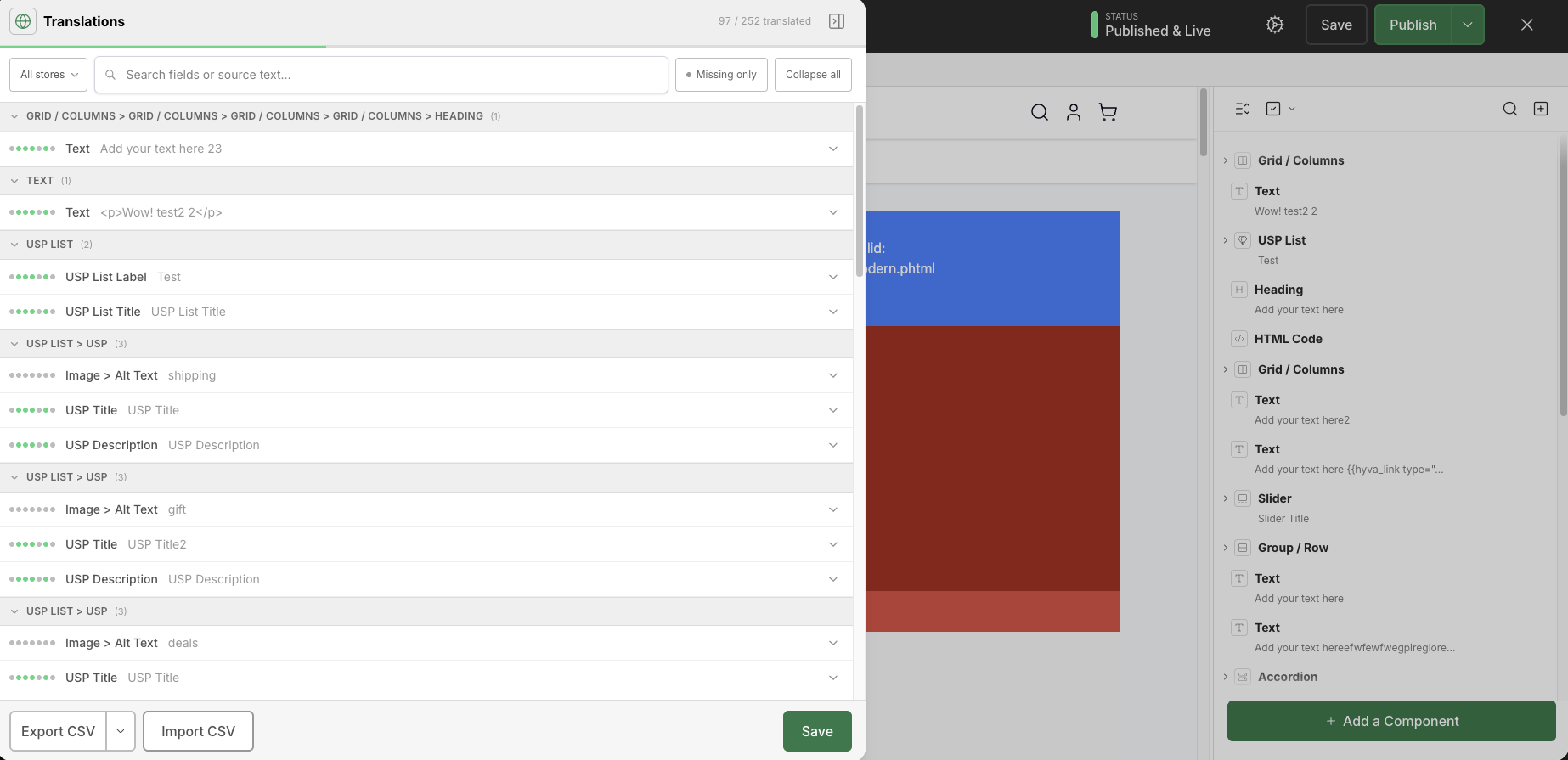
The translation panel supports:
- Manual translation entry per store view.
- CSV export.
- CSV import.
- Drag-and-drop CSV import.
- Translation status tracking.
You can access translations from:
- The Hyvä menu in the top-left of the editor.
- Translation icons shown next to fields that support translations.
Translations are enabled by default.
Admin path:
Stores > Configuration > Hyvä Commerce > Hyvä CMS > Editor Settings > Enable Translations
Translation Workspace
Available since Hyvä CMS 1.3.0
The full translation workspace is available from Hyvä CMS 1.3.0. The core translation feature is available from 1.1.0.
The default panel keeps translation focused on fields. For larger jobs, enable Use Full Translation Workspace in Editor Preferences → General. The full workspace provides searchable store coverage, website and completion filters, collapsible component groups, progress indicators and navigation to the next missing field.
Both views work with the same translation draft, so changing views does not discard your entries. CSV export can be limited to the selected scope, and import supports quoted multiline values.
Translations Versus Store View Content Overrides
Hyvä CMS translations are separate from full store-view content overrides. Use translations when the same structure should be reused with localized field values. Use store-view content overrides when the content structure itself needs to be different for a store view.
Product and category attribute content also follows Magento store-view behavior: "All Store Views" is the default, and specific store views can use the default value or override it.
AI-Assisted Translations
AI-assisted field translation is available with the separate Commerce integration. Follow Translate CMS Fields for installation and the editing workflow, and Feature Configuration for execution choices. Manual translation does not require AI packages or provider credentials.
For Developers
Component fields must opt in to translation support with "translate": true in the component declaration; see translate in the Component Declaration Schema Reference. Templates, snippets, import/export, and scheduled publication preserve translation data when the relevant options are enabled.